Microsoft Teams Calling
Turn Microsoft Teams into a fully featured business phone system. With FX Business Technologies, you can make and receive external phone calls directly inside the Microsoft Teams app, on desktop, mobile, or certified Teams handsets.
Microsoft Teams Phone System for Cairns & Far North Queensland Businesses
Turn Microsoft Teams into a complete, cloud-based business phone system without legacy PBX hardware, expensive on-site equipment, or complicated infrastructure.
For organisations across Cairns and Far North Queensland, Microsoft Teams Calling delivers reliable, enterprise-grade voice capabilities built for modern workplaces. Whether your team is in the office, working remotely, or spread across regional sites, your phone system stays connected and secure.
Integrate Teams with Direct Routing or Microsoft Calling Plans to enable seamless inbound and outbound calling locally, nationally, and globally all from the familiar Microsoft Teams environment.
What Is Microsoft Teams Calling?
Microsoft Teams Calling enables your business to make and receive professional phone calls directly from the Teams app on your desktop, laptop, or mobile device. For organisations across Cairns and Far North Queensland, it’s a smarter way to modernise communications without maintaining a traditional on-site phone system.
By integrating enterprise-grade telephony with Microsoft Teams, you can transform your existing Microsoft 365 licence into a complete cloud voice and collaboration platform. That means replacing outdated PBX hardware while gaining secure, reliable calling across the public phone network.
More Than Chat and Meetings
Out of the box, Microsoft Teams provides messaging and video meetings. However, it isn’t designed to manage professional customer calls on its own.
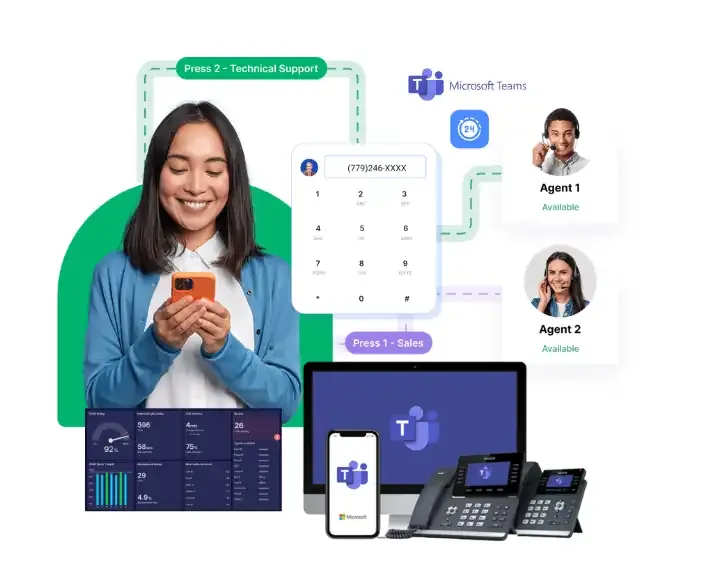
When you integrate proper business telephony, Microsoft Teams becomes a fully functional phone system with features such as:
- Inbound and outbound calling
- Auto attendants and call routing
- Call queues for customer service teams
- Reporting and call management tools
The result is a scalable communication solution built for growing businesses throughout Cairns and the wider Far North Queensland region that enables your team to stay connected and ensures your customers can always reach you.

What You Get with Microsoft Teams Calling
 Enterprise-Grade Cloud Calling
Carrier-level reliability designed for growing businesses throughout Cairns and FNQ.
Seamless Collaboration
Voice, video, chat, and meetings unified into one simple platform your team already uses.
Professional Customer Experiences
Advanced call handling, auto attendants, call queues, and reporting to ensure every call is answered efficiently.
Centralised Administration
Easily manage users, numbers, policies, and call flows from one secure interface, which makes it ideal for single and multi-site operations across Far North Queensland.
A Secure, Integrated Business Phone System with Microsoft Teams
Teams Calling also allows you to allocate staff to multiple call queues, making it easy to adapt to changing workloads. Whether your team is working from the office in Cairns, remotely across Far North Queensland, or moving between devices, calls transition seamlessly.
By integrating Microsoft Teams Calling, your business gains:
- A complete cloud PBX
- A system that handles public phone calls
- A professional front-of-house solution
- A scalable phone platform for growing teams
No on-site PBX. No ageing hardware. No disconnected conferencing platforms.
Just one secure, integrated communication system designed to scale with your business.
Advanced Calling Features for Cairns & Far North Queensland Businesses
Microsoft Teams Calling delivers powerful, customer-focused functionality that goes well beyond basic voice integration. It’s designed to help businesses across Cairns and Far North Queensland manage calls professionally, efficiently, and without legacy infrastructure.
Professional Auto Attendant (IVR)
Present a polished, professional first impression with automated call answering and intelligent routing.
Call Queues & Smart Workflows
Manage high call volumes during peak periods without missed opportunities. Ensure calls are distributed to the right team members quickly and efficiently.
Voicemail with Transcription
Access voice messages from any device, with automatic transcription so your team never misses important details.
Centralised Business Numbers
Use one consistent business number that works across desktop and mobile devices — keeping your brand identity strong while supporting flexible work.
Call Recording (Where Required)
Record calls for training, compliance, or quality assurance when needed.
CRM Integration
Connect your phone system directly with your CRM platform to streamline customer interactions and improve visibility.
Cloud-Based Redundancy
Enterprise-grade resilience ensures your communications remain operational, even during local disruptions.
Why Far North Queensland Businesses Choose FX Business Technologies
Trusted by organisations across Cairns and Far North Queensland, FX Business Technologies is proud to maintain a 4.9-star rating on Google reflecting our commitment to responsive service and reliable technology solutions.
- Locally Based Support
Our Cairns-based team answers your calls promptly and understands the unique needs of regional businesses. - Fast Onboarding & Configuration
We specialise in Microsoft Teams and business-grade telecommunications, ensuring a smooth, efficient setup with minimal disruption. - No Offshore Call Centres
When you need support, you speak directly with experienced local technicians (not an overseas help desk). - Training Included
We provide practical user training to ensure your team feels confident and capable from day one. - Ongoing Optimisation
Technology should evolve with your business. We continue refining and optimising your system to ensure it performs at its best.
See why local businesses across Cairns and Far North Queensland trust FX Business Technologies. Hear directly from our clients:
Get a quick quote for Microsoft Teams Calling
No obligation. No pressure. Just clarity.
Get a Free Phone System Quote
Microsoft Teams Calling vs Traditional Phone Systems
| Feature | Traditional PBX / On-Prem Phone System | Microsoft Teams Calling (Cloud-Based) |
| Infrastructure | Requires physical PBX hardware, server racks, maintenance, and onsite upgrades | 100% cloud-hosted. No PBX hardware, no server room, no onsite maintenance |
| Scalability | Adding users requires new handsets, cabling, or PBX expansion cards | Add users instantly from the admin portal (no hardware install required) |
| Remote & Hybrid Work | Limited remote capability, often requires VPN, desk phone, or forwarding | Works anywhere on any device: laptop, mobile, headset, Teams phone |
| Upgrades & Security | Manual upgrades, maintenance windows, patching, and aging hardware risks | Automatically updated by Microsoft with enterprise-grade security & compliance |
| Call Features | Routing, voicemail, hunt groups, etc. often require add-ons or tech support | Advanced call features built in: IVR, queues, recording, analytics, reporting |
| User Experience | Separate platform from chat, meetings, and file sharing | One app for calls, meetings, chat, files, presence, and collaboration |
| Cost Model | Large upfront capex + ongoing support contracts & SIP trunk fees | Predictable monthly subscription with no PBX replacement costs |
| Business Continuity | Outages tied to local hardware, power failure, or site damage | Cloud-hosted redundancy, geo-failover, and automatic disaster recovery |
| Device Flexibility | Desk phones required for most users | Choose desk phone, headset, mobile, laptop, or Teams Room device |
| ICT Workload | High! Patching, backup, firmware, onsite fixes, vendor tickets | Low! Cloud managed, single admin console, no hardware lifecycle management |